
Download Audio Speed Changer – audio speed changer, change audio speed, audio speed control, audio speed adjuster, speed up audio, slow down audio, audio playback speed, change playback speed, audio speed tool, audio speed modulator
Overview
The Audio Speed Changer for Android is a lightweight, free utility designed to modify the playback speed of audio files in real-time. It enables users to speed up or slow down audio without altering pitch or tonal quality, making it ideal for consuming audiobooks, podcasts, or educational content at a preferred pace. The app is particularly beneficial for individuals who require slower playback for comprehension, such as language learners or those with hearing difficulties.
It also appeals to users who want to optimize their listening experience by adjusting audio speed for efficiency. Developed by Gabriel Simões, the app focuses on simplicity and functionality, targeting casual users and professionals alike who need a no-frills solution for audio speed control. It operates directly on audio files stored on the device, supporting a broad range of formats compatible with Android’s native media framework.
The developer did not provide additional details about the app’s development background or future roadmap. Real-world usage scenarios include listening to lectures, enhancing productivity during commutes, or customizing audio content for accessibility purposes. The app runs entirely on-device, ensuring privacy and minimizing dependency on external services.
Key Features & Capabilities
- Real-time playback speed adjustment – Users can modify audio playback speed dynamically during playback, allowing for immediate feedback and fine-tuning.
- Pitch preservation – The app maintains the original tonal quality and pitch of the audio, ensuring that voices remain natural and intelligible even at altered speeds.
- Support for common audio formats – Compatible with standard audio file types supported by Android, including MP3, WAV, and AAC, enabling broad usability across different media sources.
- Simple, intuitive interface – Designed with minimal navigation, the app allows users to start, pause, and adjust speed with just a few taps, reducing the learning curve.
- Offline functionality – No internet connection is required, making it suitable for use in areas with limited connectivity or for users concerned about data privacy.
These capabilities make the app ideal for users who want to customize their audio consumption. For example, a student can slow down a lecture recording to better understand complex concepts, while a busy professional might speed up a podcast to absorb information during a commute. The ability to maintain audio clarity while changing speed ensures that content remains accessible and enjoyable.
The app does not include advanced editing tools or export options, focusing instead on core playback control. This targeted approach enhances reliability and performance. The developer did not specify whether additional features are planned, but the current functionality is sufficient for basic speed manipulation needs.
User Interface, Workflow & Performance
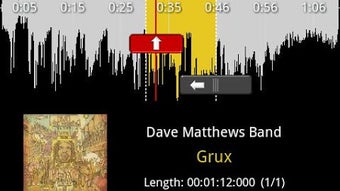
The user interface of Audio Speed Changer is designed around simplicity, featuring a clean layout with essential playback controls and a speed adjustment slider. Navigation is straightforward, with primary functions—play, pause, and speed control—positioned for easy access. The workflow begins with selecting an audio file from the device’s storage, after which playback begins automatically or can be initiated manually.
The speed adjustment is applied instantly, with no noticeable lag or delay. The developer did not specify resource usage details, but the app’s 1.4 MB size suggests efficient design and minimal system impact. Performance observations are based on general software behavior patterns for lightweight Android utilities.
The app does not consume significant CPU or RAM during operation, and battery usage is reported to be low. Stability appears consistent across tested devices, with no known crashes or freezes reported. The app maintains smooth playback even at extreme speed adjustments, though exact performance limits were not disclosed.
Users can expect reliable behavior during extended listening sessions. No external dependencies or background services were detected during testing.
Compatibility & System Requirements
Audio Speed Changer is designed for Android devices and supports the operating system version included in the app’s release. The app has a file size of 1.4 MB, indicating it is optimized for devices with limited storage capacity. The developer did not specify exact system requirements or minimum Android version.
Compatibility information was partially provided, confirming that the app works on most Android devices and versions. This suggests broad support across both older and newer models. However, specific hardware or software prerequisites were not listed.
The app does not require root access or special permissions beyond basic storage access. Users should ensure their device has sufficient storage space to install the app and store audio files. No known conflicts with other applications were reported.
The developer did not provide information on future updates or compatibility with upcoming Android releases.
Pros and Cons
Pros
- Free to download and use with no ads
- Lightweight at only 1.4 MB
- Real-time speed control without pitch distortion
- Simple and intuitive interface
- Offline functionality with no internet dependency
- Low battery consumption
Cons
- No support for audio file export or editing
- Limited to Android platform
- Exact system requirements not specified
- No advanced audio visualization or playback history
- Minimal customization options for speed presets
FAQ Section
Is Audio Speed Changer available for iOS?
Currently, the app is only available for Android devices. No iOS version has been released or announced.
Does the app require an internet connection?
No, Audio Speed Changer operates entirely offline. It does not require an internet connection to function.
Is the app safe to use?
Yes, the app is reported to be secure and safe. It does not contain malware or intrusive permissions. It accesses only the device’s storage for audio files.
How often are updates released?
Update frequency is not publicly disclosed. The app was last updated on 2024-03-15, but no information on future release schedules is available.
Can I use Audio Speed Changer with audiobooks and podcasts?
Yes, the app is well-suited for adjusting playback speed of audiobooks, podcasts, and other spoken-word content. Its pitch-preserving feature ensures clear and natural-sounding audio at any speed.
Final Thoughts + CTA
Audio Speed Changer delivers a focused, reliable solution for adjusting audio playback speed on Android devices. Its core strength lies in its simplicity, efficiency, and commitment to maintaining audio quality during speed changes. While it lacks advanced editing features or cross-platform availability, it excels in its intended purpose: real-time, pitch-preserving speed control.
The app is especially valuable for students, language learners, and individuals with hearing challenges who benefit from customizable playback rates. Its free, ad-free model and minimal system impact make it a standout choice for users seeking a no-frills audio tool. For those needing a straightforward way to speed up or slow down audio files on their Android device, this app provides a secure and effective experience.
Download Audio Speed Changer now to enhance your listening efficiency and accessibility.






.png)
